If you have searched for your own business and your website is nowhere to be found, take a breath. In most cases this is fixable, often in minutes, and usually without paying anyone.
We run an SEO business, so you might expect this page to tell you the problem is complicated and you need an expert. Most of the time you don’t. Below are the checks we run when someone sends us a “my website has vanished” email, in the order we run them. Work through them yourself. If you get to the end and you’re still stuck, there’s a way to get a free second pair of eyes at the bottom.
The usual reasons a website isn’t showing on Google
If your website isn’t showing on Google at all, the reason is usually one of the following:
it’s a new site and hasn’t been crawled yet
a WordPress setting is telling Google to stay away
a noindex tag or a robots.txt rule is blocking it
a redesign or a domain change dropped the old pages and nothing redirects them
a manual penalty, which is rare and the least likely of these
We’ll go through each one below, in the order to check. Most take a few minutes and cost nothing.
First: is your site actually missing, or just not ranking?
These are two different problems with two different fixes.
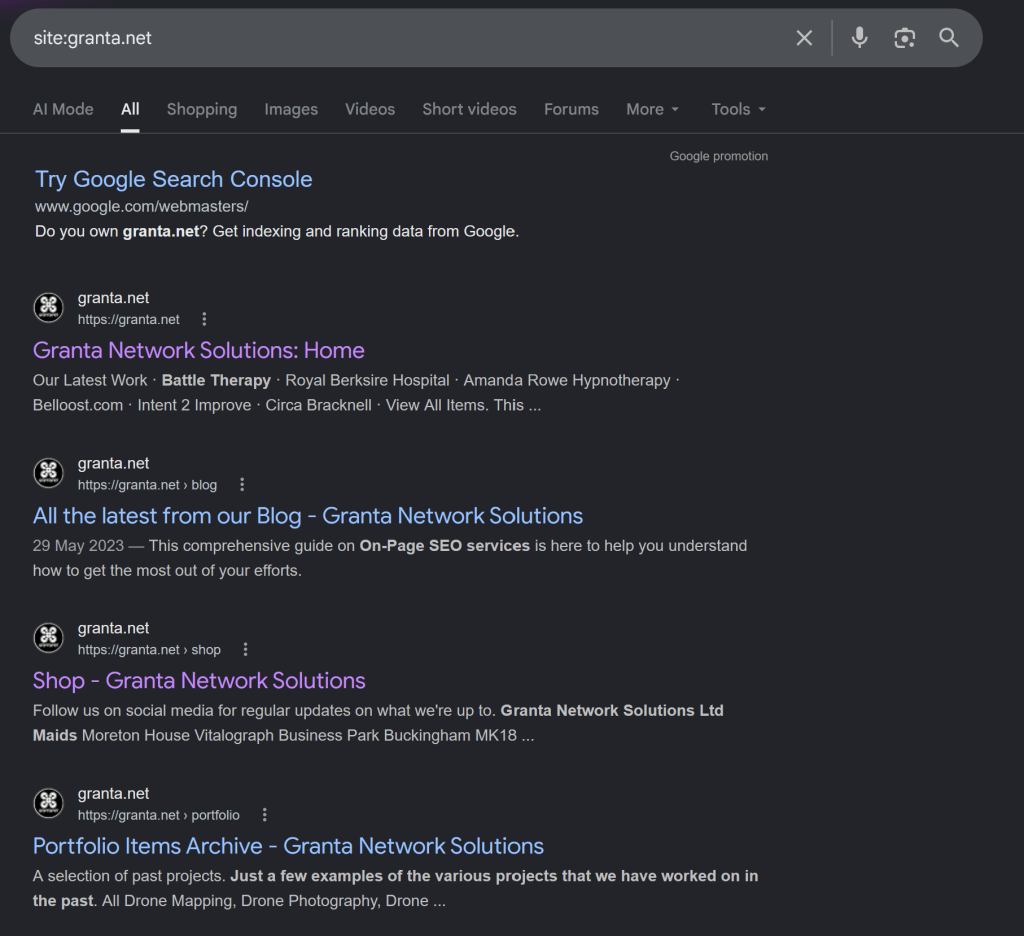
Type this into Google, replacing the domain with your own:
site:yourbusiness.co.uk
If pages appear, your site IS in Google. It’s indexed, it just isn’t ranking where you can see it. That’s a competition problem, not a technical one. Skip to the “indexed but invisible” section below.
If nothing appears, your site is not in Google’s index at all. Keep reading, the checks below will almost certainly find the cause.
Check 1: is the site new?
Google does not index new websites instantly. A brand new site can take anywhere from a few days to a few weeks to appear, longer if nothing links to it. If your site went live in the last fortnight, the fix may simply be patience plus a nudge:
Submit your sitemap (usually yourbusiness.co.uk/sitemap.xml)
Use URL Inspection on your homepage and click Request Indexing
If your site is months old and still absent, something is blocking it. Keep going.
Check 2: the WordPress tickbox that hides thousands of UK businesses
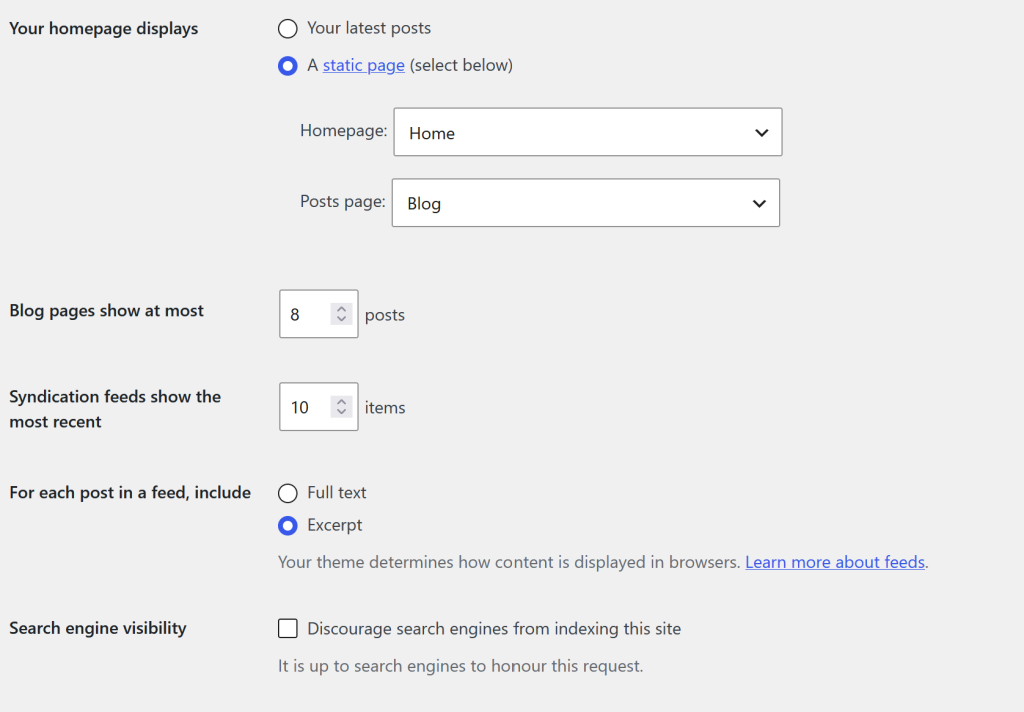
If your site runs on WordPress, check this before anything else. Log in and go to:
Settings > Reading > “Discourage search engines from indexing this site”
If that box is ticked, your site is telling Google to stay away. Web designers tick it while building a site so half-finished pages don’t appear in search, and it is very common for it to be forgotten at launch. Untick it, save, then request indexing in Search Console.
We have seen established businesses trade for months with this box ticked, wondering why the phone isn’t ringing.
Check 3: noindex tags and robots.txt
Same idea as the tickbox, but at page level. Two places to look:
robots.txt. Visit yourbusiness.co.uk/robots.txt in your browser. If you see Disallow: / under User-agent: *, your whole site is blocked from crawling. That line should not be there on a live site. It usually arrives with a copied staging configuration.
Noindex tags. View your homepage source (right click > View Page Source) and search for “noindex”. If you find <meta name="robots" content="noindex">, that page has been told to remove itself from Google. SEO plugins like Yoast and Rank Math can set this sitewide with one wrong toggle, so check the plugin settings too.
If you’re not comfortable reading page source, the URL Inspection tool in Search Console reports both problems in plain English: it will say “Excluded by noindex tag” or “Blocked by robots.txt”.
Check 4: did the site recently move, get redesigned, or change domain?
This is the most common cause of a site that WAS on Google and then disappeared. When URLs change and nothing redirects the old addresses to the new ones, Google treats the old pages as deleted and the new pages as strangers. Rankings built over years vanish.
Signs this is your problem:
The drop happened within days or weeks of a redesign, rebrand or hosting move
Old links to your site (from directories, social profiles, other websites) now show a 404 error
Search Console shows a spike in “Not found (404)” errors
The fix is 301 redirects: every old URL should permanently redirect to its closest new equivalent. If your web designer did the migration, ask them directly whether redirects were set up. It is a standard part of the job, and its absence is the single most frequent thing we find when someone’s traffic falls off a cliff after a shiny new website update. If this is what happened to you, this deserves its own article and we’re writing one. In the meantime, it’s the first thing we look at in a free check.
Check 5: a Google penalty (rare, but check it)
Genuine penalties are much rarer than people fear, and they don’t happen for innocent reasons. But the check takes ten seconds: in Search Console, open Security & Manual Actions > Manual Actions. If it says “No issues detected”, you have not been penalised. Stop worrying about this one and go back to checks 2 to 4.
If there IS a manual action listed, Google will state the reason. These days that reason is as often about low-value or mass-produced pages as it is about links. That is one of the few situations on this page where you almost certainly need professional help.
Indexed but invisible: when your site is on Google but nobody sees it
If the site: search found your pages, your problem is ranking, not indexing. Google knows you exist, it just doesn’t rank you where anyone looks. Position 40 and position 400 feel identical to your customers.
The uncomfortable truth: there is no quick tickbox fix for this one. Ranking is earned through relevance and reputation, and it responds to steady work rather than tricks:
Your pages have to say what you do and where you do it. A homepage headline that says “Welcome” instead of “Plumber in Aylesbury” gives Google nothing to rank
A Google Business Profile matters more than your website for local searches. The map results sit above the normal results, and reviews decide who wins there
Other sites linking to yours is still how Google measures reputation. Directories, suppliers, trade bodies, local press
That is a longer conversation than this page, and it’s the actual work an SEO service does. Be wary of anyone who promises page 1 in a fortnight. If it were that easy, everyone would be there.
Still stuck? Send us your address
If you have worked through everything above and your site is still missing, something less common is going on: hosting issues, hacked pages, duplicate domains fighting each other, or something we haven’t listed here.
Send us your website address using the form below and we’ll take a look and reply with what we find and whether it’s something you can fix yourself. No charge, no obligation, no follow-up sales calls. Most of these checks take us a few minutes, and if the answer is “untick a box”, we can tell you which box.
Granta Studio is based in Buckingham and works with small businesses across Buckinghamshire and beyond. If you’d rather talk it through, our contact page is the best way to get in touch.
FAQ
How long does it take for a new website to show on Google? Anywhere from a few days to a few weeks. Submitting a sitemap through Google Search Console usually speeds it up considerably.
Why does my website show on Bing but not Google? They are separate indexes with separate rules. A robots.txt block or noindex tag aimed at Google, a Google-specific penalty, or simply slower Google crawling can cause this split. Run the checks above; the cause is nearly always visible in Google Search Console.
Does it cost money to get listed on Google? No. Google’s organic listings and Google Business Profile are free. You never need to pay to be included, only if you choose to run ads.
My website shows when I search the business name but not for my services. Why? That’s the “indexed but invisible” situation above. Google knows who you are but doesn’t yet rank you for what you do. That is ranking work: clearer page targeting, a well-maintained Google Business Profile and reputation built over time.
Why is my website not showing on Google? Run the site: search in the first section above. If pages appear, you are indexed and the problem is ranking. If nothing appears, work through checks 1 to 5: a new site, the WordPress discourage-indexing box, a noindex tag or robots.txt rule, a redesign that broke the URLs, or a manual action. One of those is almost always the answer.
Why is my website not on Google at all? A site that is completely absent, with no pages returned by a site: search, is being blocked rather than out-ranked. The usual culprits are the WordPress “discourage search engines” tick box or a leftover noindex or robots.txt rule from a staging site. Both are in checks 2 and 3 and both take a minute to fix.
This comprehensive guide on On-Page SEO services is here to help you understand how to get the most out of your efforts. From keyword research and content optimisation to website structure, learn what it takes to make sure your website is optimised for the highest search engine rankings and traffic.
We’ll cover all the latest tips, tools, and strategies for evaluating On-Page SEO service providers, understanding search intent, optimising visuals for SEO, improving page speed, crafting SEO-friendly URLs, taking advantage of title tags, meta descriptions, and questions-based titles, and more.
None of this matters if Google can’t see your site in the first place. If you’re not appearing in Google search results at all, fix that before touching on-page work.
Join us as we explore the world of On-Page SEO and discover the answers to all your related questions.
Short Summary
On-Page SEO. Services are essential for optimising websites and boosting search engine visibility.
Use On-Page SEO tools to optimise website elements such as keywords, titles, meta descriptions, visuals, URLs, and page speed.
Evaluate On-Page SEO Service Providers using criteria such as E-A-T, keyword research, SEO writing, visual assets, title tags, meta descriptions, search intention, lifetime of content, satisfactory scope, and page speed for successful SEO implementation.
What is On-Page SEO?
On Page SEO is an important part of a comprehensive SEO strategy. It involves optimising elements on a web page, such as the page’s title, meta descriptions, and keywords, in order to improve search engine rankings, increase website traffic, and ensure that search engine crawlers are able to easily understand and index the page. On-page SEO consists of three distinct categories. These are content, HTML and website architecture. Each has their own purpose in optimising a webpage for search engines.
Content is a key factor in On-Page SEO. In order for a website to rank highly on search engine results pages (SERPs), content must be optimised to include targeted keywords, provide value to the reader, and provide context to the search engine crawlers. Additionally, visuals, such as images and videos, can be used to supplement the content and make it more engaging.
HTML and website architecture also play an important role in On-Page SEO. Title tags, meta descriptions, and URLs should all be optimised to ensure they are relevant to the user and that search engine crawlers can easily understand the page. Additionally, page speed should be optimized to ensure that users are able to quickly and easily navigate the website. Internal links should also be used to promote content and link related pages together.
By implementing effective On-Page SEO strategies, businesses can improve their search engine visibility and increase website traffic. SEO professionals and website owners should use free SEO tools to analyze their website performance and make any necessary changes to ensure that their website is properly optimized for search engines.
Why is On-Page SEO Important?
On Page SEO is essential for any website that wants to rank in search engine results, as it is the process of optimizing the content and structure of a website to better meet the needs of search engines. It involves optimising elements such as keyword research, content optimisation, website structure, title tags, meta descriptions, and visuals to ensure that search engines can understand and index your website correctly. By optimising these elements, websites can gain an edge in the competition for higher rankings in search engine results pages (SERPs).
On-Page SEO is important because it enables websites to get the most out of their search engine optimisation efforts. It can help to ensure that the website is indexed correctly and that the right keywords are used in the right places, so that the website appears in relevant search results. This can dramatically improve a website’s visibility and ranking, making it easier to be found by potential customers. Furthermore, well-optimised content can provide a more engaging experience for the user, increasing the likelihood of conversions. On-Page SEO can also increase a website’s page speed and mobile compatibility, both of which are important ranking factors for Google. With the help of free SEO tools such as Google’s PageSpeed Insights and Mobile-Friendly Test, website owners can easily check their website’s performance and make the necessary changes to improve their On-Page SEO.
On-page SEO is essential for any website that wants to rank in search engine results, as it is the process of optimising the content and structure of a website to better meet the needs of search engines. It is also important for websites to create unique content that satisfies search intent and is optimised for conversions. Additionally, websites should ensure that their copy is free from errors and that their titles, meta descriptions, and URLs are optimised for SEO. These are all important on-page SEO elements that can significantly improve a website’s rankings in search engine results.
What are On-Page SEO Services?
On Page SEO Services are a set of practices and strategies used to optimize individual web pages for better search engine rankings. This includes optimising elements like titles, meta descriptions, keywords, visuals, and website structure. On Page SEO is important because it helps search engines understand, index, and rank web pages, resulting in improved visibility for the website and higher search engine rankings.
For example, keyword research is a crucial On Page SEO service that helps a website determine the most effective keywords to use on a page. Content optimisation involves strategically adding keywords within the content to increase the relevancy of the page while ensuring it still reads naturally. Website structure optimisation ensures that pages are properly linked so that search engine crawlers can easily find and index them. Additionally, optimising title tags, meta descriptions, and visuals can help make a page more visually appealing and engaging.
The Benefits of On-Page SEO Services
On Page SEO Services can help boost search engine visibility by optimising elements such as title tags, meta descriptions, visuals, URLs, and internal links to make it easier for search engines to crawl and index the website. This helps improve website rankings and visibility in search engine results pages (SERPs). Furthermore, On-Page SEO is an on-page SEO strategy. Services can help boost website traffic by improving search engine rankings, thus allowing more clicks and visits from users searching for relevant keywords.
Lastly, On-Page SEO. Services can enhance user experience by optimising website content and structure, making it more captivating, informative, and effortless to navigate. This can result in longer visit durations, decreased bounce rates, and increased conversion rates.
On-Page SEO. Services can provide a wide range of benefits to any website, and they are an essential part of any successful SEO strategy. As the SEO industry evolves, so do On-Page SEO Services, and companies can benefit from the use of free SEO tools to identify areas which need improvement and monitor the effects of their On-Page SEO efforts.
By optimizing On-Page SEO elements such as title tags, meta descriptions, visuals, URLs, and internal links, companies can help ensure their web pages are optimized for search engines and users alike. This not only helps improve website rankings, but also enhances user experience, resulting in more visits and potentially higher conversion rates.
How to Choose an On-Page SEO Service Provider
Selecting the right On-Page SEO Service Provider is essential for a successful SEO strategy. It is important to consider the provider’s experience, reputation, and pricing when choosing a service provider. The best way to evaluate potential On-Page SEO Service Providers is to ask for case studies, testimonials, and online reviews from past customers. Additionally, inquire about pricing and guarantees that are offered.
When you’re selecting an On-Page SEO Service Provider, be sure to research the company thoroughly. Consider their portfolio of satisfied customers, the quality of their reviews, and the scope of services they offer. It is important to ensure that the provider is experienced in all aspects of On-Page SEO, including keyword research, content optimization, website structure, and page speed. Additionally, they should have access to the latest tools and technologies, such as search engine journal, free SEO tools, and page speed optimization.
In addition to the technical aspects of On-Page SEO, the provider should also be knowledgeable about on page optimization factors such as page titles, meta descriptions, keywords, visuals, and internal links. They should also be able to provide advice regarding off page SEO, local SEO, and other aspects of search engine optimisation.
On-page work is one piece of the wider picture. For businesses that sell to a specific area, it feeds into local SEO in Buckinghamshire.
Chapter 2: On-Page SEO Services
Chapter 2 provides an in-depth look into On-Page SEO Services, starting with an introduction to the various SEO services available. It explains how keyword research, content optimisation, and website structure are essential components of an effective On-Page SEO strategy. Each of these elements must be optimised if you want to maximise your website’s visibility and rankings in search engine results.
Keyword research is a crucial part of On-Page SEO Services, as it helps you identify the topics and keywords that your target audience is searching for. This knowledge can then be used to tailor your content to fulfil user expectations and improve your website’s visibility in SERPs.
Content optimisation involves crafting content that satisfies user intent, by utilising descriptive headings, addressing common questions, and including relevant visuals. Website structure is also key for On-Page SEO, as it enables search engines to comprehend the arrangement and organisation of your website’s content.
Keyword Research
Keyword research is an essential part of On-Page SEO Services, as it allows you to discover the topics and keywords that your target audience is searching for. By researching and analysing the search volume and keyword difficulty, you can create content that is tailored to the right audience. Long-tail keywords are also useful for attracting more targeted traffic to your website, as they typically have lower keyword difficulty and search volume.
Additionally, keyword frequency is important for On-Page SEO as it signals to search engines that a page is relevant to a specific topic. However, it’s important to use the keyword naturally and not overdo it, as this can be seen as spam.
The Keyword Magic tool can be a great asset for keyword research, as it allows you to quickly identify related keywords, along with their search volume and keyword difficulty.
Content Optimization
HTML elements are key for On-Page SEO, as they enable search engines to comprehend the content and structure of a web page. Understanding Search Intent is also essential for successful On-Page SEO, as it helps to ensure that the web page is providing the most relevant results that fulfil the user’s needs.
To optimize content for Search Intent, you should first gain an understanding of the intent behind the target keyword. Then craft content that precisely answers the user’s query and delivers value. This can include utilizing descriptive headings, addressing common questions, and including relevant visuals.
Click View > Developer > > View Source in the top menu to discover the source code of a web page on your browser. This can be found in the top menu. This will open a new window with the web page’s source code for you to explore.
Website Structure
Internal linking is essential for On-Page SEO, as it helps to distribute link authority throughout your site, making it easier for search engines to crawl and index your pages. Using an SEO tool such as Semrush is a great way to optimise your internal linking. Their “Indexed pages” report can help you identify which pages on your site have the most link authority.
From there, you can add a few internal links from those pages to a high-priority page on your site, for maximum optimisation. An example of internal linking would be strategically connecting one of the most authoritative pages to a high-priority page on the site.
Chapter 3: Optimising Content for On-Page SEO
Title tags and meta descriptions are essential elements of On-Page SEO. They provide search engines with a concise overview of the content on a page, which can help increase click-through rates and search engine rankings significantly. Additionally, optimising content for On-Page SEO can help search engines understand the page’s relevancy better and increase the chances of ranking in image search.
Creating optimised, high-quality content is key to achieving success with On-Page SEO. This includes formatting blog posts, using topic clusters, and covering all relevant subtopics. Additionally, keywords play an important role in On-Page SEO and can be used to target long-tail versions of target keywords to further improve rankings. Leveraging Latent Semantic Indexing (LSI) keywords can also help Google understand the page’s relevancy better.
Title Tags
Title tags are an essential snippet of code that allows you to give a web page a title, and they are a powerful ranking factor for On-Page SEO. They can impact whether a user decides to click on a page, so it is important to optimize them for maximum effect. To do this, place your target keyword closer to the beginning of the title tag, and leverage title tag modifiers like “best”, “guide”, “checklist”, “fast” and “review” to target long-tail versions of target keywords.
A good optimisation project to tackle quickly and easily is shortening page titles that are longer than 60 characters. You should also consider using emotional titles to draw attention to your page as it can effectively boost click-through rate by 7%. Additionally, avoid terms like “insane” and “powerful” to make titles look like clickbait for maximum impact.
Meta Descriptions
Meta descriptions can be incredibly powerful for On-Page SEO. They provide a concise overview of the content on a page, which can help increase click-through rates and search engine rankings significantly. To ensure your meta descriptions are effective, it is recommended to keep them between 155-160 characters, include a keyword once in the description, and follow other best practices.
Additionally, meta descriptions can benefit you by providing Google with a better understanding of your web page content, resulting in higher click-through rates for your website. However, it is important to note that meta descriptions are not a direct ranking factor.
If the meta description you wrote isn’t aligned with the user’s search intent or the content on the page, then Google may choose to craft its own description for the SERP. This is why it is important to keep your meta description up to date.
Keywords
Keywords are essential for SEO as they are the words or phrases that people use to find information or products in search engines. Optimizing your website content for these keywords can help you improve your search engine rankings, get more visibility for your website, and drive more traffic to your site.
To unlock the power of the Keyword Magic Tool, simply enter a seed keyword or phrase, select the country and language you want to target, and voilà! You’ll be presented with a list of related keywords and their search volume, competition, and other metrics to help you choose the best ones for your content. It’s important to use the same keyword multiple times in the content and to use related keywords to avoid keyword stuffing, which is over use of keywords.
It is also important to keep keyword density in mind, as having too few or too many keywords can negatively impact your search engine rankings. Here are a few tips to keep in mind when using keywords for On-Page SEO: use a keyword in the page’s title, use the same keyword in the meta description, use a keyword in the web address, and use relevant keywords in the content.
Visuals
Optimising visual content can significantly boost the page’s SEO and increase the chances of ranking in image search. Images can help break up long chunks of text, draw attention to calls to action, and provide a visual appeal to web pages. Additionally, they can help visitors to your website stay on the page longer, which can help with on-page SEO.
Image Optimization is the key to optimizing the technical aspects of visual assets on a webpage. This involves compressing images, resizing them to fit the page, and optimizing the file size and format. Additionally, it is important to use descriptive filenames and alt text for images, as this will help search engines understand the content better.
One can maximize visibility by giving every image on the site a descriptive file name and alt text, using a file name that includes the target keyword, and using the same keyword as part of the image alt tags. Additionally, linking images to external sources via Google Images and other search engines can help draw more traffic to the site.
Chapter 4: Optimizing Website Structure for On-Page SEO
Website structure can be incredibly beneficial for On-Page SEO as it helps search engines understand the organization of your website and how pages are linked to each other. This makes it easier for search engines to quickly and accurately crawl and index your site.
Additionally, optimizing the structure of your website can help users navigate your site more easily, which can lead to improved engagement and visibility. With well-structured websites, search engine crawlers can find, index, and rank pages efficiently, resulting in higher search engine rankings.
URLs
A URL (Uniform Resource Locator) is an incredibly useful and unique identifier used to locate a resource on the Internet. URLs are key to successful On-Page SEO because they give search engines valuable context about the page’s content.
To create SEO-friendly URLs that will help you rank higher, use the terms you want to rank for in your URL. Keep URLs simple, easy to read, and avoid using special characters, numbers, and stop words. Use hyphens to separate words for better readability.
Internal Links
Internal links are hyperlinks that connect pages within a single website. This process allows users to navigate between the different content of the website easily. They can significantly help with On-Page SEO by improving website navigation, enhancing user experience, and boosting search engine visibility.
By strategically linking to other pages on your website, you can help search engines understand the structure of your website and the relationships between different pages. When crafting anchor text for internal links, it’s important to use natural language and avoid over-optimization.
Going beyond just keywords and using descriptive text that accurately reflects the content of the linked page is key. Additionally, it’s best to avoid using generic anchor text like “click here” or “read more”.
Page Speed
Page speed is essential for SEO because it directly affects how quickly a website loads and displays its content. Search engines prioritize websites that load quickly and provide a great user experience, so page speed is key for achieving a high ranking.
You can significantly enhance page speed by compressing images, eliminating superfluous website code, minimizing HTTP requests, and enabling browser caching. Additionally, Total Blocking Time (TBT) is a great metric to closely estimate First Input Delay (FID), which measures the time between a user’s first interaction with a website and the website’s response to that interaction. By measuring the total amount of time that a webpage is blocked from responding to user input, TBT can help us provide a better user experience.
Chapter 5: Evaluating On-Page SEO Services
Evaluating On Page SEO services is essential for businesses that want to optimize their website for search engine success. By carefully assessing the provider’s experience and portfolio, surveying keywords, optimizing on-page elements like title tags, content, internal links, and URLs, and identifying weaknesses and opportunities on the current site, businesses can ensure that they are getting the best On-Page SEO services.
It is important to consider criteria such as pricing, communication, reporting, and customer service to make sure the On-Page SEO service provider is a good fit for your business.
Tools
On-page SEO tools can be incredibly beneficial for businesses who want to optimize their website and maximize their search engine rankings. By utilizing tools such as SEOptimer, Ahrefs’ Keyword Explorer, Copyscape, Screaming Frog, and Moz Pro, businesses can audit their website to identify and fix technical issues, research keywords, analyse backlinks, and optimize their website content and structure for search engine success.
Leveraging such tools can help businesses take their On-Page SEO services to the next level.
Criteria
Considering criteria when evaluating On-Page SEO services is essential for businesses that want to make sure they are getting the best services. Businesses should take into account E-A-T, keyword research, SEO writing, visual assets, title tags, meta descriptions, search intention, lifetime of content, satisfactory scope, and page speed to ensure they get the most out of their On-Page SEO services.
For example, understanding search intention is essential for businesses to create content that is more relevant to their target audience, and visual assets can help decrease bounce rates and increase user engagement – both of which can lead to improved search engine rankings.
Summary
The success of a company’s online presence is now more important than ever as we continue to navigate the digital age. On-Page SEO. Services are an invaluable tool to optimize search engine visibility, website traffic and user experience. It is critical to choose an On-Page SEO Service Provider who is experienced, reputable, and offers a fair price that includes the desired services.
By taking advantage of keyword research, content optimization, and website structure knowledge, businesses can ensure their website ranks higher in SERPs, increases visitor numbers and improves overall user experience. Evaluating your On-Page SEO. Services choices with care can provide fantastic results for any business who is understanding of the power of SEO.
Whether you consult professionals or take the DIY route, optimizing your web page elements is essential for successful 21st century digital marketing strategies. Investing in the best On-Page SEO tools will help keep your website competitive and relevant during these times of digital transformation – making sure to focus on user experience, site speed, and utilizing effective keywords for content.
Taking the time to understand and implement On-Page SEO Services will result in tremendous rewards in terms of increased visibility and website success.
Frequently Asked Questions
What is on page SEO example?
Did you know that on-page SEO can have a significant impact on your website’s rankings? On-page SEO tactics such as including headings and subheadings, creating internal links, and optimizing images and alt-text are all simple yet effective ways to boost your site.
Implementing these strategies can help you be found more easily by search engines—and drive interested visitors to your webpages.
What are the 4 types of SEO?
Tap into the power of SEO and make your site shine! On-page SEO, Off-page SEO, Local SEO and Technical SEO are the four main types of SEO that can help you optimize your website for search engine visibility.
Take the time to understand each one and you’ll be on your way to dominating your industry!
What are the top 5 on page SEO factors?
Optimizing your website for on-page SEO is essential; incorporating keyword research, URL optimization, meta tags, header tags, keyword usage in content, and proper image optimization are all key components to boosting your ranking in search engine results.
If done correctly, these factors can strongly enhance your SEO success. If all this sounds a bit daunting, don’t worry, we can take care of all of it for you. Get in touch to find out how.
A commercial operation is defined as: ‘flight by a small unmanned aircraft except a flight for public transport, or any operation of any other aircraft except an operation for public transport;
which is available to the public; or
which, when not made available to the public, in the case of a flight by a small unmanned aircraft, is performed under a contract between the SUA operator and a customer, where the latter has no control over the remote pilot or in any other case, is performed under a contract between an operator and a customer, where the latter has no control over the operator,
in return for remuneration or other valuable consideration.’
The key elements in understanding this term are ‘…any flight by a small unmanned aircraft…in return for remuneration or other valuable consideration’.
The term ‘available to the public’ should be interpreted as being a service or commodity that any member of the public can make use of, or actively choose to use, (e.g. because it has been advertised or offered to someone).
Examples showing how commercial operations are defined are available in our guidance for small UAS operators.
An ‘SUA operator’, in relation to a small unmanned aircraft, is the person who has the management of the small unmanned aircraft.
A congested area means, ‘in relation to a city, town or settlement, any area which is substantially used for residential, commercial, industrial or recreational purposes’.
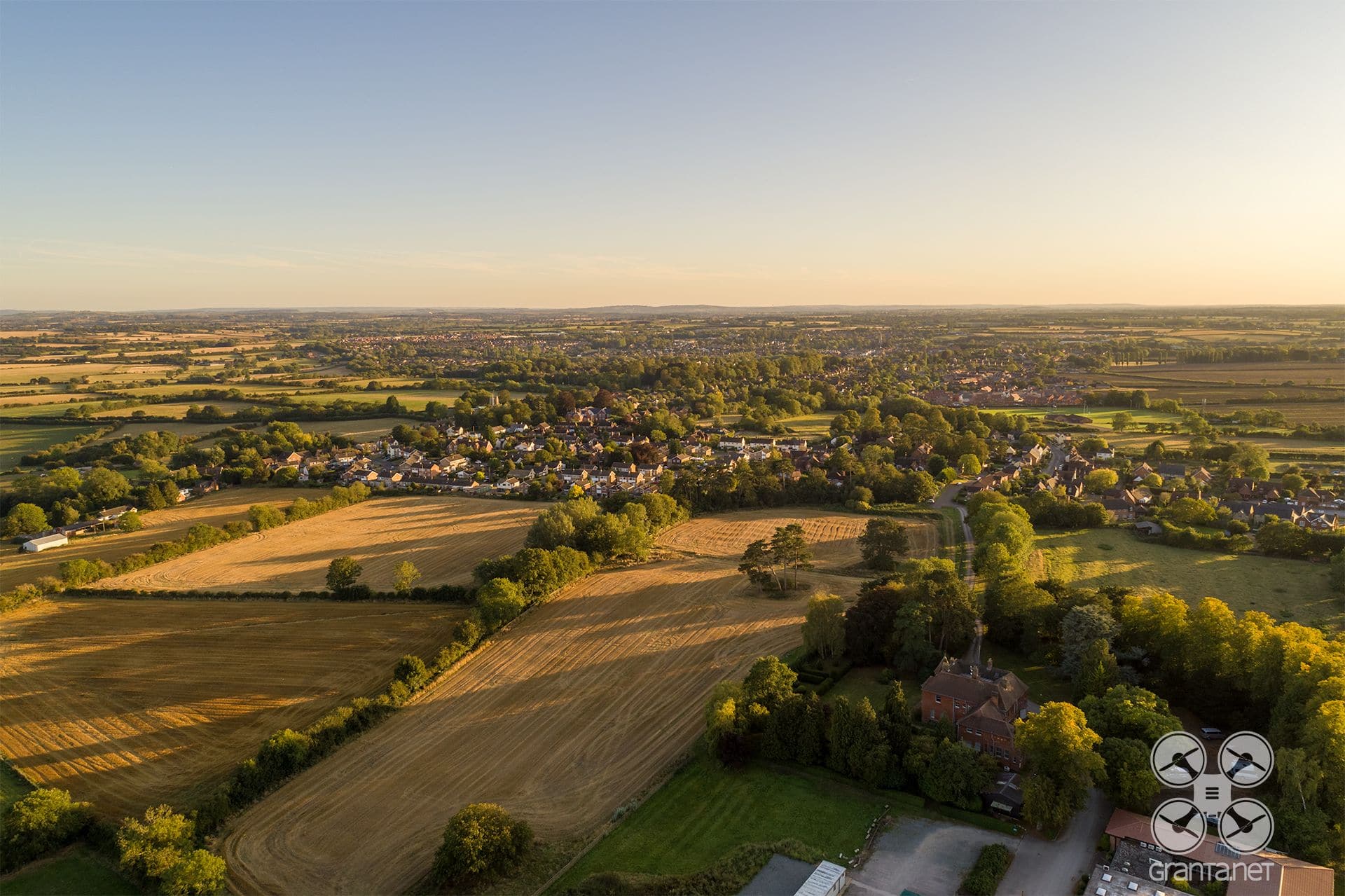
This is a congested area. You cannot currently fly a drone here legally without a PfCO
These rules have been established to provide a safe environment in which small unmanned aircraft can be flown without coming into conflict with manned aircraft and without risk to other people or properties.
You must have a Permission issued by the CAA before you conduct any commercial operations with your UAS.
Sorry what was that?
Ok let’s try to break that down a bit.
First of all SUA (small unmanned aerial) or UAS/UAV (unmanned aerial system/vehicle) is just another term for drone.
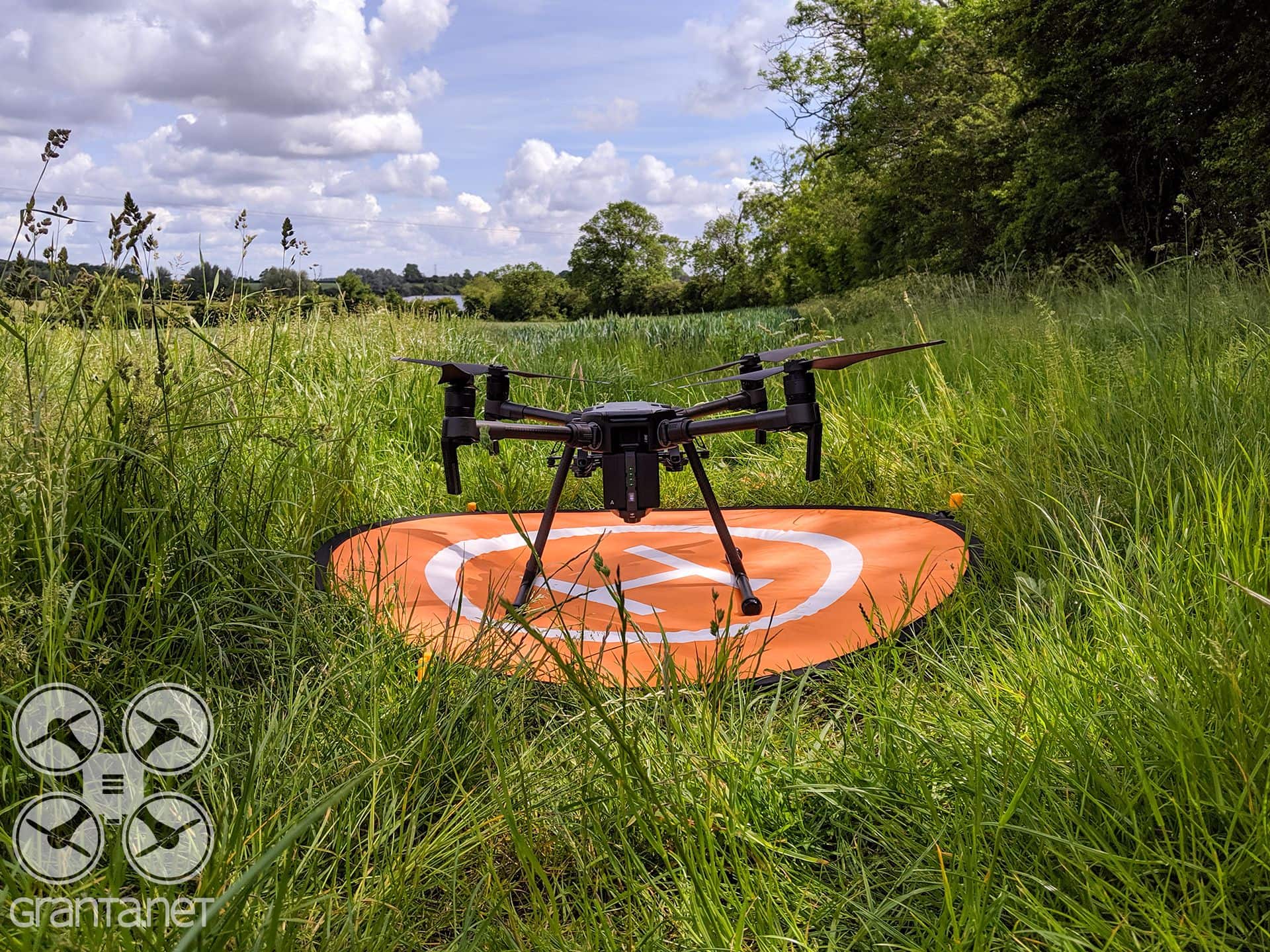
This is a drone
There are others such as RPAS (remote piloted aerial system) but we’ll just stick to drone.
We’ve highlighted the main part in the above in bold.
The key part is that if you’re paying someone to fly a drone, or even offering something valuable in return (e.g. an exchange of services) then it is a commercial flight.
For example an estate agent taking aerial property photos counts as a commercial drone operation.
Other examples of forms of commercial flight are if you are flying a drone and taking photos or videos that you intend to sell on at a later date.
Another really important point in the above is that flights in ‘congested areas’ can only be carried out by commercial drone operators.
What is a commercial drone operator?
In the UK, to be a commercial drone operator you need to have a PfCO (permission for commercial operations) from the CAA (Civil Aviation Authority).
All outdoor drone flights in the UK are covered by aviation law, as drones are considered to be aircraft, albeit small, unmanned ones (hence the S and U in SUAS).
That means that they are covered by a piece of law known as the ANO (air navigation order) that dictates UK air law.
There are specific articles within the ANO that relate to drone flights. These are articles 94 and 95 and more generally 240 and 241, that apply to all aircraft.
What’s a PfCO?
A PfCO is a Permission for commercial operations. Often referred to as a drone licence.
It’s a permission from the CAA to modify certain parts of articles 94 and 95 that allows the holder to fly drones commercially and also in congested areas.
Any UK drone operator has to have one of these if they want to fly drones commercially.
This is not the same as drone registration, although there has been plenty of confusion around that.
How do you get a PfCO?
In order to get a PfCO you have to complete a training course that consists of both practical and theory exams (a bit like a driving test for drone pilots).
You also then need to produce an operations manual, that details how you will work and fly drones safely. It includes details of emergency procedures, training, flight logs, etc.
All of this has to be approved when you apply and also every year when you renew your PfCO.
It’s (potentially) a lot of paperwork and red tape to deal with and if you want to be a commercial drone you need to become an expert at assessing and mitigating the risk of flying a drone in various situations.
Anyone flying a drone commercially without a PfCO will not be insured (try asking insurance companies about drones…)
They may well not have planned the flight and identified potential risks
They may not understand what to do in the event of an emergency
They may have limited understanding of the capabilities of their drone, especially in challenging situations
So, if you need someone to carry out any commercial drone operation, or any drone flight within a congested area (which is basically any city, town, village, industrial estate, etc) then please get in touch with us to see how we can help.
We live in strange and uncertain times. The current global situation is without precedent in living memory.
2020 had already started out on a shaky footing, with widespread flooding after weeks of heavy rain. Not to mention the uncertainty that Brexit brings with it.
A sunset shot taken from our offices looking back towards Buckingham back when life was less complicated!
Now, we’re faced with a global pandemic, bringing with it far reaching consequences for people across the world.
We are of course, following all government advice on the situation and aware that it is evolving on a daily basis.
Drones and Covid-19
However, at the moment it is business as usual for us – as a business, especially when it comes to operating drones, we are used to keeping our distance from people.
Benefits of Drones
For safety reasons, to lower the risks to uninvolved people, we operate at a distance of 30m from people on take off and landing and 50m during flight. That’s under normal circumstances.
We can also offer assistance with monitoring sites for security purposes. Especially if you have large sites and are operating with minimal staff levels, monitoring with drones can have added benefits.
Drone Deliveries?
Sadly we are not in a position to offer deliveries by drone. As it stands with the current UK legislation, they are not legal yet anyway, although trials are being conducted to assess their viability.
If your customers can’t get to you, let’s take you to your customers. At least in a virtual sense.
Immersive 360 photography and video tours can give your customers the ability to see what you provide, without the need to be physically present at your location.
Whilst this isn’t suitable for all circumstances, there are many applications for it, such as showcasing property either for rent or to buy.
We understand that these are difficult times for many businesses, including our own. Whilst it might seem counter-intuitive to spend money at the moment, now is as good a time as any to embrace the efficiency and safety benefits that technology can bring.
Have you heard of it? Do you care? Should you care about it? Does it even apply to you?
On the 5th of November 2019, the much anticipated (not always for the right reasons) UK drone registration became a thing.
The long and the short of it is that, if you fly drones (or model aircraft), in the UK, you had until the 30th of November 2019 to register.
After that time, you could be breaking the law.
Amazingly, almost a year later some commercial operators are finding themselves in trouble when they come to renew because they did not register in time.
This is a drone
It’s not quite that straightforward, of course and there are some caveats, subtleties and nuances to this that have been causing some confusion.
We are going to try to clear those up for you.
Who has to register?
All drone operators in the UK had until the 30th of November 2019 to register with the CAA and get their operator ids.
Part of this proved very controversial amongst commercial pilots and operators (such as ourselves) who are already ‘registered’ with the CAA. We have already proved (in theory and in practice) our knowledge and competence on drones*
We already pay the CAA every year for the privilege of being allowed to fly them, so why should we have to register again and pay another fee?
Who or what is a drone operator?
If you fly a drone for fun, then you are a drone operator. That means you have to register and get an operator id.
The only exception to that (currently) is if the drone(s) that you fly are all under 250g in weight (oh hello there recently launched 249g Mavic mini).
If you are an organisation that flies drones, for whatever reason, then you are a drone operator. Examples of organisations from the CAA’s website:
businesses (that will be us then)
schools
colleges
universities
voluntary organisations
clubs
charities
An operator only needs one operator id, no matter how many drones are flown by them. For example, we currently fly 3 drones, all are registered using our operator id.
A flyer id is an individual id that you get after taking a 20 question, multiple choice test. You can take the test as many times as you like until you get enough questions right. So there really shouldn’t be any excuse for not passing.
Do I need a flyer id?
Anyone flying a drone needs a flyer id. Even children under 13 (although a parent needs to register on their behalf here).
The only exemption to this (that we are aware of at the time of writing) are commercial pilots flying under a PfCO. Whether it’s their own PfCO or that of their employer. The reason for that is that we have already proved our knowledge and competency to fly (right?) so we don’t need to do it again.
There is a special form to download and keep with your Ops manual ORS4 1327 that proves this exemption. Download it here.
I’ve got my ID’s can I fly commercially now?
Nope. You still need a PfCO to fly a drone commercially in the UK. Getting an operator id and a flyer id and passing a 20 question multiple choice quiz do not mean you can fly your drone commercially.
Reportedly, the database to handle the registrations cost several million pounds to develop.
As we have indicated above, all drone operators are meant to register. However, the only operators that the CAA already has the details of are commercial operators.
Hobbyists, those who fly drones (and model aircraft) for fun are largely not known to the CAA. Therefore getting them to register is going to be problematic.
Having recently done a drones for schools presentation to a local primary school, it strikes us that most of the people who really should be registering, have no idea that drone registration is a requirement of any kind.
Ironically it also seems that, thanks to the current political turmoil in the UK, the legislation to give the police powers to enforce this, has yet to make it through parliament.
Hopefully, this article has helped to demystify the whole thing a bit, provide the links to the info you need (if you need to register) and, given you something to read, if nothing else.
Manage Consent
To provide the best experiences, we use technologies like cookies to store and/or access device information. Consenting to these technologies will allow us to process data such as browsing behaviour or unique IDs on this site. Not consenting or withdrawing consent, may adversely affect certain features and functions.
Functional
Always active
The technical storage or access is strictly necessary for the legitimate purpose of enabling the use of a specific service explicitly requested by the subscriber or user, or for the sole purpose of carrying out the transmission of a communication over an electronic communications network.
Preferences
The technical storage or access is necessary for the legitimate purpose of storing preferences that are not requested by the subscriber or user.
Statistics
The technical storage or access that is used exclusively for statistical purposes.The technical storage or access that is used exclusively for anonymous statistical purposes. Without a subpoena, voluntary compliance on the part of your Internet Service Provider, or additional records from a third party, information stored or retrieved for this purpose alone cannot usually be used to identify you.
Marketing
The technical storage or access is required to create user profiles to send advertising, or to track the user on a website or across several websites for similar marketing purposes.